Creating a functional home office is one of the most valuable improvements you can make to support productivity, comfort, and long term work efficiency. Whether you work remotely full time, manage personal projects, attend virtual meetings, or handle administrative tasks at home, a well planned workspace improves focus and reduces daily frustration.
A successful home office setup does not require a large room or expensive furniture. Instead, it depends on thoughtful layout decisions, ergonomic choices, lighting strategy, and storage planning. With the right approach, even a compact area can become a productive and comfortable workspace.
Why a Functional Home Office Setup Matters More Than Ever
Working from home changes how people interact with their living environment. Without a dedicated workspace, productivity often suffers and boundaries between personal and professional time become unclear.
A well designed home office helps:
- Improve concentration during work hours
- Reduce physical strain from poor posture
- Keep supplies organized and accessible
- Support better video meeting presentation
- Create a clear separation between work and home life
Even a simple setup designed thoughtfully can significantly improve daily workflow.
Choose the Right Location First
Selecting the correct location is the most important step when planning a home office. The space should support focus while minimizing distractions.
Helpful location considerations include:
- Distance from high traffic areas
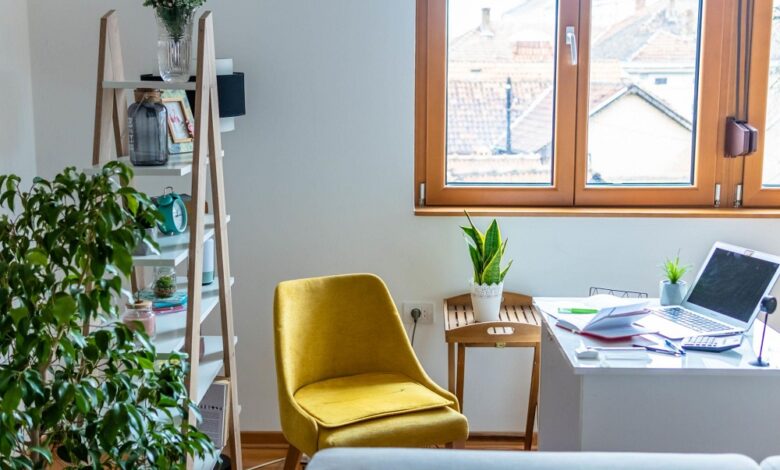
- Access to natural light
- Availability of electrical outlets
- Noise levels during work hours
- Space for comfortable seating and movement
If a separate room is unavailable, consider using a corner of a bedroom, living room, or hallway area that can function as a consistent workspace.
Consistency in location helps establish a productive routine.
Select a Desk That Matches Your Work Style
The desk is the foundation of any functional home office. Choosing the right size and design ensures comfort and efficiency throughout the day.
Important desk selection factors include:
- Surface area for computer equipment
- Space for writing or paperwork
- Cable management features
- Height compatibility with your chair
- Storage integration if needed
Compact desks work well in smaller spaces, while corner desks maximize unused room areas effectively.
Standing desks are also increasingly popular for improving posture and encouraging movement during long work sessions.
Invest in a Comfortable Ergonomic Chair
An ergonomic chair is one of the most important investments in a home office setup. Poor seating causes fatigue, back discomfort, and reduced productivity.
Look for chairs that provide:
- Adjustable seat height
- Lumbar support
- Breathable materials
- Armrest flexibility
- Stable base support
Comfortable seating supports better posture and helps prevent long term strain during extended work hours.
Even small adjustments in chair quality can make a noticeable difference in daily comfort.
Plan Lighting Carefully for Productivity and Comfort
Lighting directly influences focus and energy levels throughout the workday. A combination of natural and artificial lighting creates the most effective workspace environment.
Helpful lighting strategies include:
- Positioning desks near windows when possible
- Using adjustable task lamps
- Avoiding glare on computer screens
- Adding layered lighting for darker rooms
- Selecting neutral white light for clarity
Balanced lighting improves both productivity and eye comfort.
Proper placement prevents shadows and reflections that interfere with screen visibility.
Organize Storage to Reduce Distractions
Clutter reduces efficiency and makes workspaces feel stressful. Planning storage early ensures that frequently used items remain accessible without overwhelming the desk surface.
Effective storage options include:
- Floating shelves
- Drawer organizers
- Vertical file holders
- Storage cabinets
- Wall mounted boards
Keeping surfaces clear improves concentration and supports a professional looking workspace.
Vertical storage is especially useful in compact home offices.
Position Your Equipment for Maximum Efficiency
Desk layout affects how easily tasks can be completed throughout the day.
Helpful positioning tips include:
- Keeping the monitor at eye level
- Placing frequently used items within reach
- Positioning the keyboard at a comfortable height
- Leaving space for writing areas
- Managing cables neatly behind equipment
Thoughtful equipment placement reduces unnecessary movement and improves workflow consistency.
Even small adjustments can increase productivity significantly.
Create Clear Separation Between Work and Personal Space
Maintaining separation between work and home environments helps improve mental focus and work life balance.
Simple separation strategies include:
- Using shelving as visual boundaries
- Adding area rugs to define workspace zones
- Facing desks away from relaxation areas
- Using folding screens in shared rooms
Even partial separation helps signal the start and end of the workday more clearly.
Structured environments support stronger routines and better concentration.
Choose Technology That Supports Your Workflow
Reliable technology is essential for a successful home office setup. Equipment should match your daily tasks and communication needs.
Helpful technology essentials include:
- A stable internet connection
- Reliable computer equipment
- External keyboard if needed
- Headphones for meetings
- Webcam positioned at eye level
Choosing dependable tools prevents interruptions and supports smoother communication during virtual collaboration.
Investing in the right equipment saves time and frustration over the long term.
Manage Cables for a Clean Workspace Appearance
Cable clutter quickly makes a workspace feel disorganized and distracting.
Cable management solutions include:
- Under desk cable trays
- Cord clips
- Cable sleeves
- Wireless accessories when possible
Keeping cables hidden improves safety and creates a more professional looking environment.
Organized workspaces encourage consistent productivity habits.
Personalize the Workspace Without Creating Distractions
Adding personal touches helps make a workspace comfortable and motivating, but too many decorative items reduce focus.
Balanced personalization ideas include:
- One or two framed photos
- A small indoor plant
- Minimal wall artwork
- Coordinated desk accessories
Carefully chosen details improve comfort while maintaining workspace clarity.
The goal is to support productivity rather than overwhelm the environment.
Plan for Flexibility as Work Needs Change
Work requirements often evolve over time. A flexible setup allows adjustments without replacing furniture or rearranging the entire room.
Flexible planning ideas include:
- Choosing modular shelving
- Using adjustable chairs and desks
- Selecting movable storage units
- Leaving room for additional equipment
Adaptable workspaces remain useful as responsibilities grow or change.
Planning ahead prevents future redesign challenges.
Maintain Airflow and Comfort Throughout the Day
Comfort extends beyond furniture and lighting. Temperature and airflow influence productivity more than many people expect.
Helpful comfort improvements include:
- Positioning desks away from direct heat sources
- Ensuring proper ventilation
- Using adjustable blinds for sunlight control
- Keeping frequently used items within reach
Comfortable environments help maintain consistent focus throughout long work sessions.
Even small environmental adjustments support better daily performance.
Establish a Daily Workspace Routine
Consistency strengthens productivity habits and improves time management.
Simple routine building strategies include:
- Starting work at the same location each day
- Keeping supplies organized before ending the day
- Adjusting lighting based on time of day
- Clearing the desk surface regularly
Structured routines reinforce the purpose of the workspace and support long term success.
FAQ Section
What is the ideal desk height for a home office setup
Most desks work best at a height that allows elbows to rest comfortably at about a ninety degree angle while typing.
How much space is needed for a basic home office setup
A functional home office can be created in an area as small as four to six feet wide if furniture is selected carefully.
Should a home office face a wall or open room area
Facing a wall often reduces distractions, while facing open space can improve comfort depending on personal preference.
Is natural light necessary for a productive workspace
Natural light improves comfort and energy levels but effective artificial lighting can provide similar benefits when windows are unavailable.
What flooring works best in a home office environment
Hard surface flooring with an area rug often supports chair movement while improving comfort and noise control.
How can shared spaces function as temporary home offices
Portable desks, folding screens, and movable storage units help shared rooms adapt quickly to workspace needs.
How often should a home office setup be updated
Reviewing workspace layout every six to twelve months helps ensure furniture and equipment continue supporting productivity effectively.